ESP32 Weather Sensor on MQTT with a PT100 Probe
Objective
The goal of this project is to create a weather sensor that sends its data to an MQTT broker.
We had to design the signal conditioning for the 3-wire PT100 probe, and the ESP32 code. I also developed an MQTT client application in Swift to receive the data and display it on a phone.
Implementation
Signal Conditioning
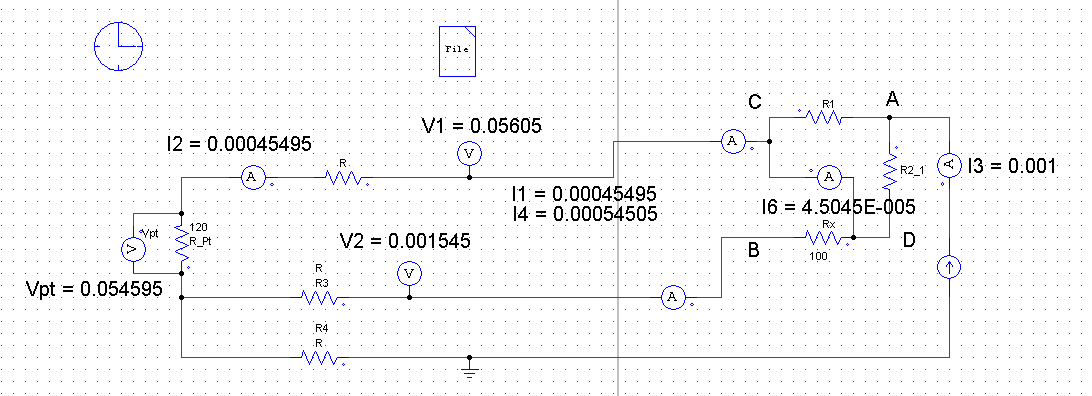
We used a constant current circuit to condition the PT100 probe signal. The circuit is as follows:
- An LM334 current generator that generates a constant current of 1mA
- An AD623 instrumentation amplifier that measures and amplifies the PT100 probe signal
We also experimented with a Wheatstone bridge circuit.
PSIM Simulation
ESP32 and MQTT
Once the measurement was done, we had to send the measured temperature to an MQTT broker, in a specific topic. For this, I used the Adafruit_MQTT library. I had to install an MQTT broker on a server to test the code, so I used Mosquitto.
Adafruit_MQTT_Publish test = Adafruit_MQTT_Publish(&mqtt, "/temperature");iOS Application
This application was not required in the project, but I developed it to be able to visualize the data sent by the ESP32. I used the CocoaMQTT framework, which is an MQTT client in Swift. The application is designed in SwiftUI.
CocoaMQTT
I had to create a ViewModel (inheriting CocoaMQTTDelegate), which manages MQTT events, and updates the application data.
Click to display the ViewModel code
class MQTTViewModel: ObservableObject, CocoaMQTTDelegate {
	@Published var state: ConnectionState
	@Published var temperature: String
	@Published var error: String?
	@Published var error2: String?


	@Published var MQTTUser: String = "rw"
	@Published var MQTTPassword: String = "readwrite"
	@Published var MQTTTLS: Bool = false


	var mqtt: CocoaMQTT

	init() {
		self.state = .unconnected
		self.temperature = "..."
		self.mqtt = CocoaMQTT(clientID: "CocoaMQTT-" + String(ProcessInfo().processIdentifier), host: "test.mosquitto.org", port: 1884)
	}

	func mqttSettings() {
		mqtt.username = MQTTUser
		mqtt.password = MQTTPassword
		mqtt.keepAlive = 60
		mqtt.enableSSL = MQTTTLS
		mqtt.delegate = self
		_ = mqtt.connect()
		print(self.self)
		print(mqtt.clientID)
	}

	func mqtt(_ mqtt: CocoaMQTT, didConnectAck ack: CocoaMQTTConnAck) {
		print("ack: \(ack)")

		switch(ack) {

		case .accept:
			mqtt.subscribe("/temperature", qos: CocoaMQTTQoS.qos1)
			self.state = .connected
			self.mqtt = mqtt
			self.error = nil
			break

		case .unacceptableProtocolVersion:
			self.error2 = ack.description
		case .identifierRejected:
			self.error2 = ack.description
		case .serverUnavailable:
			self.error = "Server unavailable"
		case .badUsernameOrPassword:
			self.error2 = "Bad username or password"
		case .notAuthorized:
			self.error2 = "Not authorized"
		case .reserved:
			self.error2 = ack.description
		}

		if ack == .accept {
			//chatViewController?.mqttVersion = mqttVesion
			//navigationController!.pushViewController(chatViewController!, animated: true)
		}

	}


	func mqtt(_ mqtt: CocoaMQTT, didPublishMessage message: CocoaMQTTMessage, id: UInt16) {

	}

	func mqtt(_ mqtt: CocoaMQTT, didPublishAck id: UInt16) {

	}

	func mqtt(_ mqtt: CocoaMQTT, didReceiveMessage message: CocoaMQTTMessage, id: UInt16) {
		if let msg = message.string {
			print(msg)
			UINotificationFeedbackGenerator().notificationOccurred(.success)
			if let temperature = Double(msg) {
				self.temperature = String(format: "%.1f", temperature)
			} else {
				self.temperature = msg
			}
		} else {
			print(message)
		}
	}

	func mqtt(_ mqtt: CocoaMQTT, didSubscribeTopics success: NSDictionary, failed: [String]) {
		print("did subscribe to topics:")
		print(success)
        if failed.count > 0 {
            print("failed to subscribe to topics:")
            print(failed)
        }
	}

	func mqtt(_ mqtt: CocoaMQTT, didUnsubscribeTopics topics: [String]) {
	}

	func mqttDidPing(_ mqtt: CocoaMQTT) {
	}

	func mqttDidReceivePong(_ mqtt: CocoaMQTT) {
	}

	func mqttDidDisconnect(_ mqtt: CocoaMQTT, withError err: Error?) {
		if let msg = err?.localizedDescription {
			print("Error: \(msg)")
			self.error = msg
			UINotificationFeedbackGenerator().notificationOccurred(.error)
		}
		self.state = .disconnected
	}


}